HAProxy EP 2: TCP Proxy for Flask Application
 Syed Jafer K
·
·4 min read
Syed Jafer K
·
·4 min read
Meet Jafer, a backend engineer tasked with ensuring the new microservice they are building can handle high traffic smoothly. The microservice is a Flask application that needs to be accessed over TCP, and Jafer decided to use HAProxy to act as a TCP proxy to manage incoming traffic.
This guide will walk you through how Jafer sets up HAProxy to work as a TCP proxy for a sample Flask application.
Why Use HAProxy as a TCP Proxy?
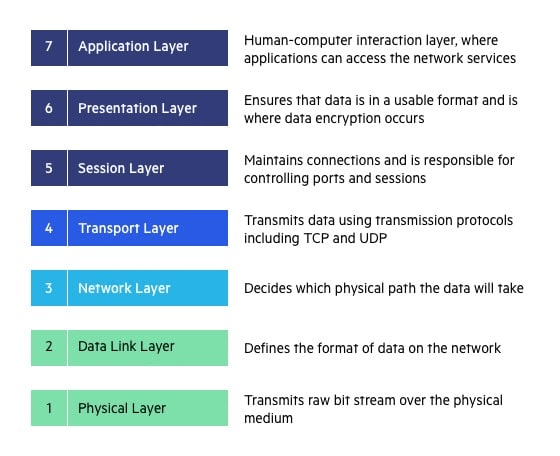
HAProxy as a TCP proxy operates at Layer 4 (Transport Layer) of the OSI model. It forwards raw TCP connections from clients to backend servers without inspecting the contents of the packets. This is ideal for scenarios where:
- You need to handle non-HTTP traffic, such as databases or other TCP-based applications.
- You want to perform load balancing without application-level inspection.
- Your services are using protocols other than HTTP/HTTPS.
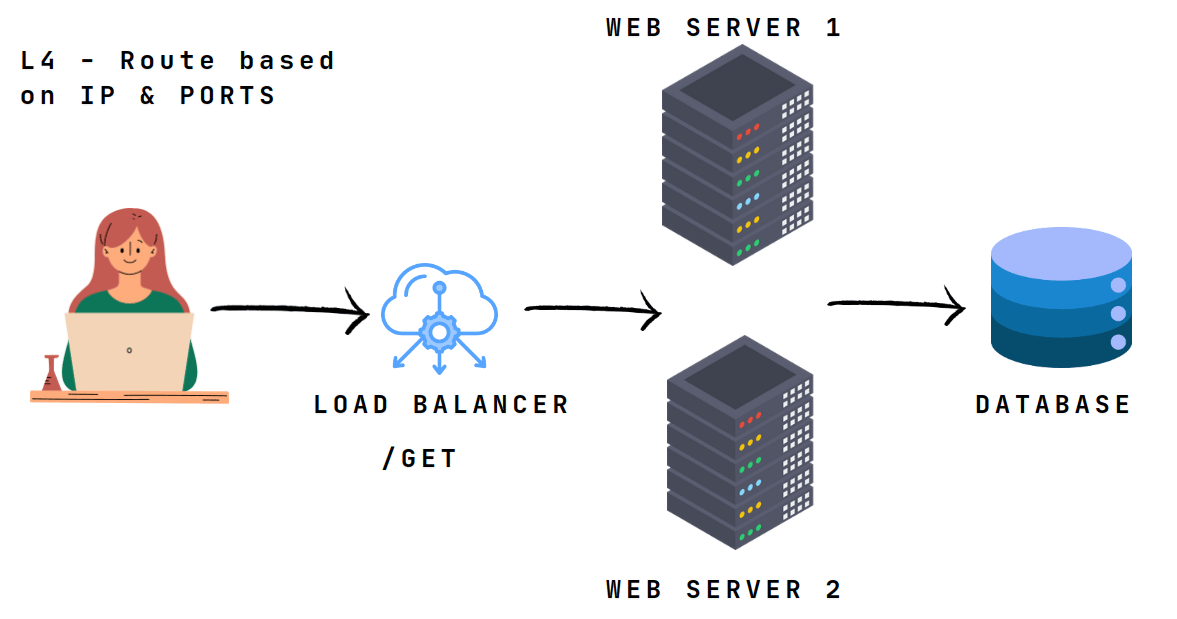
In this layer, it can’t read the packets but can identify the ip address of the client.
Step 1: Set Up a Sample Flask Application
First, Jafer created a simple Flask application that listens on a TCP port. Let’s create a file named app.py
from flask import Flask, request

app = Flask(__name__)

@app.route('/', methods=['GET'])
def home():
    return "Hello from Flask over TCP!"

if __name__ == "__main__":
    app.run(host='0.0.0.0', port=5000)  # Run the app on port 5000
Step 2: Dockerize the Flask Application
To make the Flask app easy to deploy, Jafer decided to containerize it using Docker.
Create a Dockerfile
# Use an official Python runtime as a parent image
FROM python:3.9-slim

# Set the working directory
WORKDIR /app

# Copy the current directory contents into the container at /app
COPY . /app

# Install any needed packages specified in requirements.txt
RUN pip install flask

# Make port 5000 available to the world outside this container
EXPOSE 5000

# Run app.py when the container launches
CMD ["python", "app.py"]
To build and run the Docker container, use the following commands
docker build -t flask-app .
docker run -d -p 5000:5000 flask-app
This will start the Flask application on port 5000.
Step 3: Configure HAProxy as a TCP Proxy
Now, Jafer needs to configure HAProxy to act as a TCP proxy for the Flask application.
Create an HAProxy configuration file named haproxy.cfg
global
    log stdout format raw local0
    maxconn 4096

defaults
    mode tcp  # Operating in TCP mode
    log global
    option tcplog
    timeout connect 5000ms
    timeout client  50000ms
    timeout server  50000ms

frontend tcp_front
    bind *:4000  # Bind to port 4000 for incoming TCP traffic
    default_backend flask_backend

backend flask_backend
    balance roundrobin  # Use round-robin load balancing
    server flask1 127.0.0.1:5000 check  # Proxy to Flask app running on port 5000
In this configuration:
- Mode TCP: HAProxy is set to work in TCP mode.
- Frontend: Listens on port
4000and forwards incoming TCP traffic to the backend. - Backend: Contains a single server (
flask1) where the Flask app is running.
Step 4: Run HAProxy with the Configuration
To start HAProxy with the above configuration, you can use Docker to run HAProxy in a container.
Create a Dockerfile for HAProxy
FROM haproxy:2.4

# Copy the HAProxy configuration file to the container
COPY haproxy.cfg /usr/local/etc/haproxy/haproxy.cfg
Build and run the HAProxy Docker container
docker build -t haproxy-tcp .
docker run -d -p 4000:4000 haproxy-tcp
This will start HAProxy on port 4000, which is configured to proxy TCP traffic to the Flask application running on port 5000.
Step 5: Test the TCP Proxy Setup
To test the setup, open a web browser or use curl to send a request to the HAProxy server
curl http://localhost:4000/
You should see the response
Hello from Flask over TCP!
This confirms that HAProxy is successfully proxying TCP traffic to the Flask application.
Step 6: Scaling Up
If Jafer wants to scale the application to handle more traffic, he can add more backend servers to the haproxy.cfg file
backend flask_backend
    balance roundrobin
    server flask1 127.0.0.1:5000 check
    server flask2 127.0.0.1:5001 check
Jafer could run another instance of the Flask application on a different port (5001), and HAProxy would balance the TCP traffic between the two instances.
Conclusion
By configuring HAProxy as a TCP proxy, Jafer could efficiently manage and balance incoming traffic to their Flask application. This setup ensures scalability and reliability for any TCP-based service, not just HTTP-based ones.
Originally published on parottasalna.com.